Details
-
Bug
-
Status: Open
-
 Medium
-
Resolution: Unresolved
-
Xporter Cloud 5.0.0
-
None
-
Chrome: Version 147.0.7727.117 (Official Build) (arm64)
Description
Description
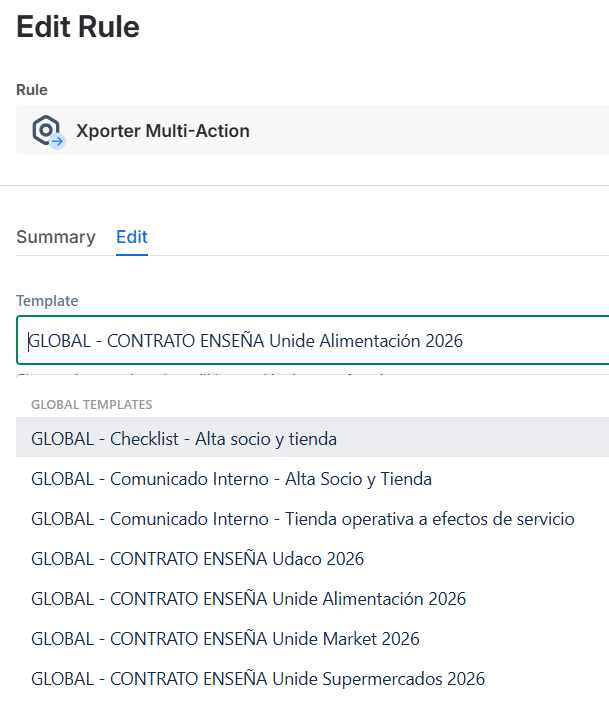
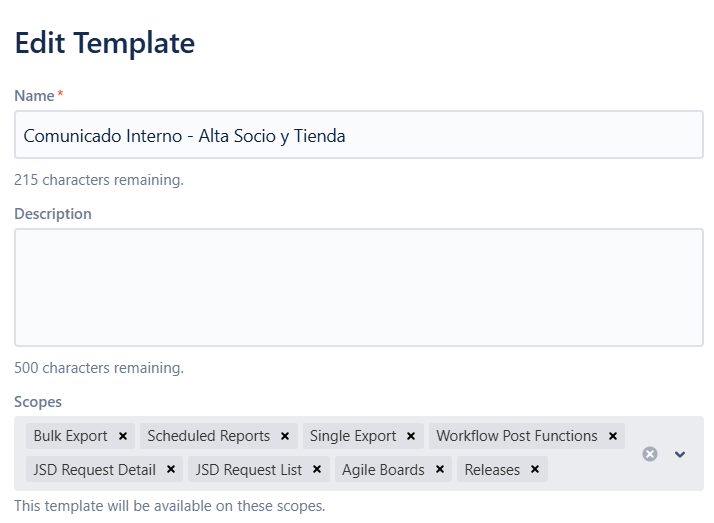
Project-level templates that are configured with "workflow post-function" scope are not appearing in the workflow post-function UI. The UI only displays global templates, even though project templates are explicitly scoped to support workflow post-functions.
Pre-conditions
- Xporter Cloud instance is configured
- At least one project-level template exists
- A workflow with a post function is configured
How to reproduce
- Create a project-level template with "workflow post-function" scope enabled
- Go to project settings
- Navigate to workflows
- Edit the workflow
- Select a transition
- Click on "Perform actions"
- Select "Xporter multiaction"
- Click "Next"
- Observe that project templates do not appear in the template dropdown
Actual result
- Only global templates are shown in the workflow post function template selector.
- Project-level templates are not available despite the scope indicating they should be.
Expected result
- Project-level templates with workflow post-function scope should appear alongside global templates in the post function UI
- Users should be able to select either global or project level templates when configuring post-functions
Version
- Xporter Cloud 5.0.0
Workaround
- Add project templates to global templates also so they appear in post-function selection
Attachments
Issue Links
- duplicates
-
XPOR-254 Loading...