Details
-
Bug
-
Status: Resolved
-
 Minor
Minor
-
Resolution: Fixed
-
Xray DC 8.4.1, Xray DC 8.4.2
-
None
-
UI
Description
Description
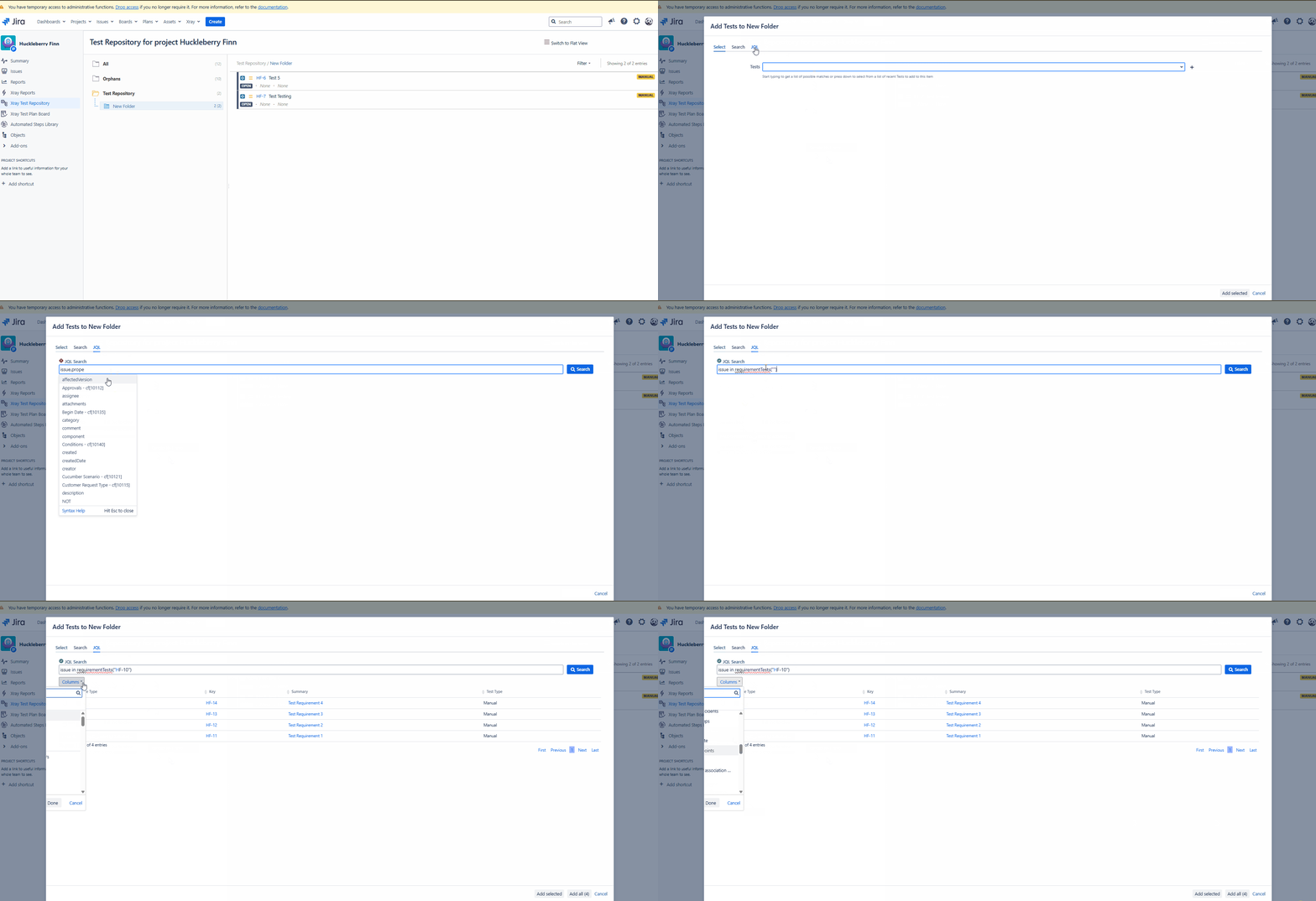
When adding Tests to the Test Repository using the JQL search option, the columns in the results table are displayed incorrectly and appear cut off, making the information difficult to view and use.
How to reproduce
- Navigate to the Test Repository
- Right-click in a sub-folder
- Select the option to Add Tests
- In the “Add Tests” dialog, click the JQL tab
- Enter a valid JQL query and click Search
- When clicking on the dropdown arrow in Columns
- The information appears cutoff and is not possible to see the options
Actual result/Attachments
The Columns options do not appear correctly, being impossible to see the options
Expected result
Expected behavior is that the columns should remain visible and display correctly after performing a JQL search and clicking the Columns dropdown.
Version
- 8.4.1-j10
- 8.4.2 - j10
Workaround
Attachments
Issue Links
- duplicates
-
XDC-819 Loading...