Details
-
Bug
-
Status: Closed
-
 Major
Major
-
Resolution: Fixed
-
R3.0.1
-
None
-
None
Description
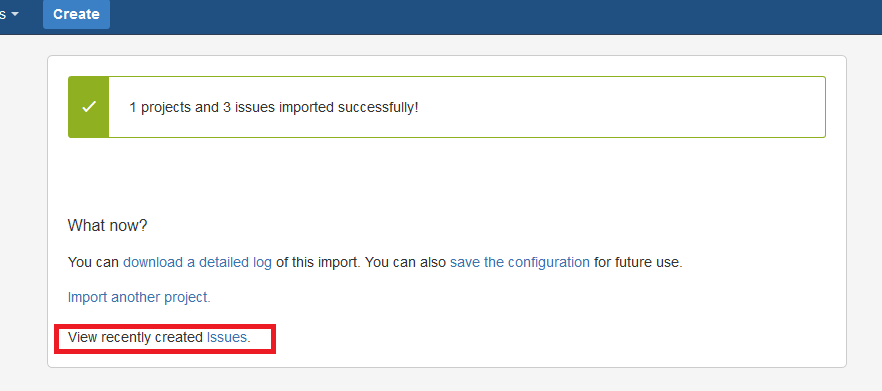
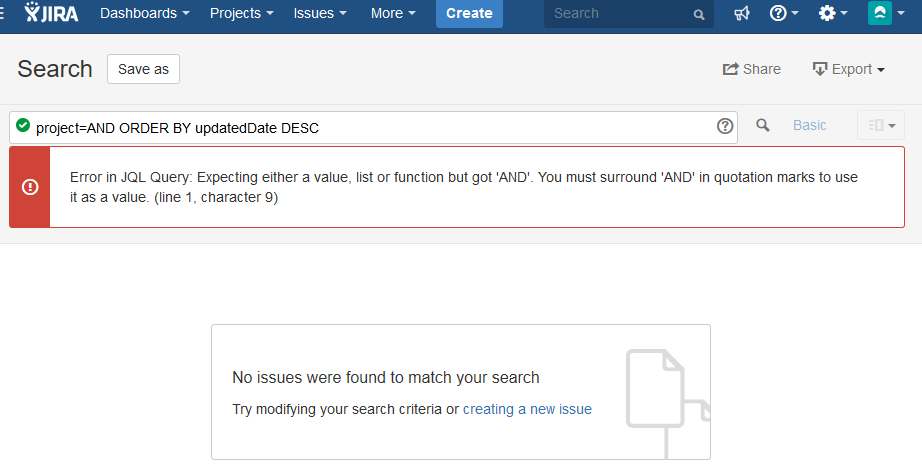
If a Project Key is the same as JIRA JQL Operators or Keywords, after using the Test Case Importer successfully and clicking the "View recently created Issues." link, the issue list is loaded with an error on the JQL statement, because the project name is mistaken with a JQL operator/keyword.
In order to fix this, a solution would be to have the generated the JQL statement when clicking the "View recently created Issues." wrap the Project Key with "".
On the example from screenshot-2, the Project Key was And from project Android
JIRA OPERATORS:
EQUALS: =
NOT EQUALS: !=
GREATER THAN: >
GREATER THAN EQUALS: >=
LESS THAN: <
LESS THAN EQUALS: <=
*IN
NOT IN
CONTAINS: ~
DOES NOT CONTAIN: !~
*IS
IS NOT
*WAS
WAS IN
WAS NOT IN
WAS NOT
CHANGED
JIRA KEYWORDS:
*AND
*OR
*NOT
*EMPTY
*NULL
ORDER BY
The ones with an * should be the problematic, because they are a single word with less than 10 characters, so could be used as Project Keys