Details
-
Suggestion
-
Status: New
-
Resolution: Unresolved
-
None
-
None
-
None
-
-
20
Description
Description
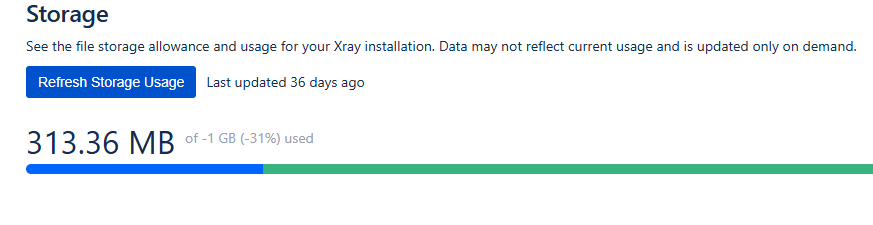
For Xray Enterprise customers, the Storage page currently displays values such as "-1 GB (-31%) used".
Since Xray Enterprise includes unlimited storage, displaying a storage limit of -1 GB and a corresponding usage percentage is confusing and does not represent the actual licensing model.
The UI should either:
- Hide the storage limit and percentage entirely for Enterprise licenses, or
- Display a clearer message, such as "Unlimited Storage," together with the current storage consumption.
User friction
Customers reviewing storage usage may incorrectly assume:
- Their storage configuration is broken.
- They have exceeded a quota.
- Xray is reporting incorrect usage data.
- Additional action is required to resolve a storage problem.
This often generates unnecessary support questions and reduces confidence in the reported information.
Steps to reproduce (right now) / Actual Result:
- Install or use an Xray Enterprise instance.
- Navigate to Xray Settings → Storage.
- Observe the storage usage information.
Actual Result:
The page displays values similar to:
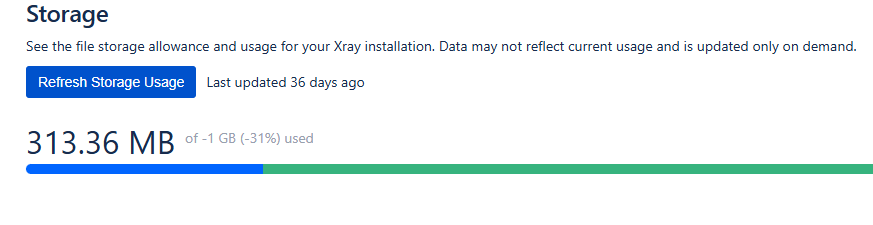
Even though Enterprise storage is unlimited.
IMPACT
The feature works correctly from a licensing perspective, but the UI displays misleading information that can lead to confusion and unnecessary support investigations.
What would improve if solved:
- Clearer communication of Enterprise storage entitlements.
- Reduced customer confusion.
- Fewer support tickets regarding storage limits.
- Better alignment between the licensing model and UI presentation.
Impact on stakeholders:
- Enterprise customers reviewing Dtorage consumption.
- Customer Success teams explaining licensing entitlements.
- Support teams handling avoidable storage-related questions.
Current workaround:
Support manually explains that:
- Enterprise storage is unlimited.
- The "-1 GB" value represents the internal unlimited setting.
- The displayed percentage should be ignored.
CONTEXT & EXAMPLES:
Current UI example:
313.36 MB of -1 GB (-31%) used
Expected Enterprise experience could be:
313.36 MB used (Unlimited Storage)
or
Unlimited Storage
Current Usage: 313.36 MB
Concrete example:
An Enterprise customer opens the Storage page and sees:
313.36 MB of -1 GB (-31%) used
The customer may interpret this as a product defect or licensing issue because a negative storage limit is displayed.
Workaround risk:
Low technical risk, but continued confusion can lead to:
- Incorrect assumptions about storage restrictions.
- Unnecessary support requests.
- Reduced confidence in the storage reporting functionality.