Details
-
Suggestion
-
Status: New
-
Resolution: Unresolved
-
None
-
None
-
None
Description
Description
Currently, the status summary pop-up box on the Test Set List gadget shows only the raw test count per status. To see the percentage each status represents, users must hover over each colour segment in the bar individually.
User friction
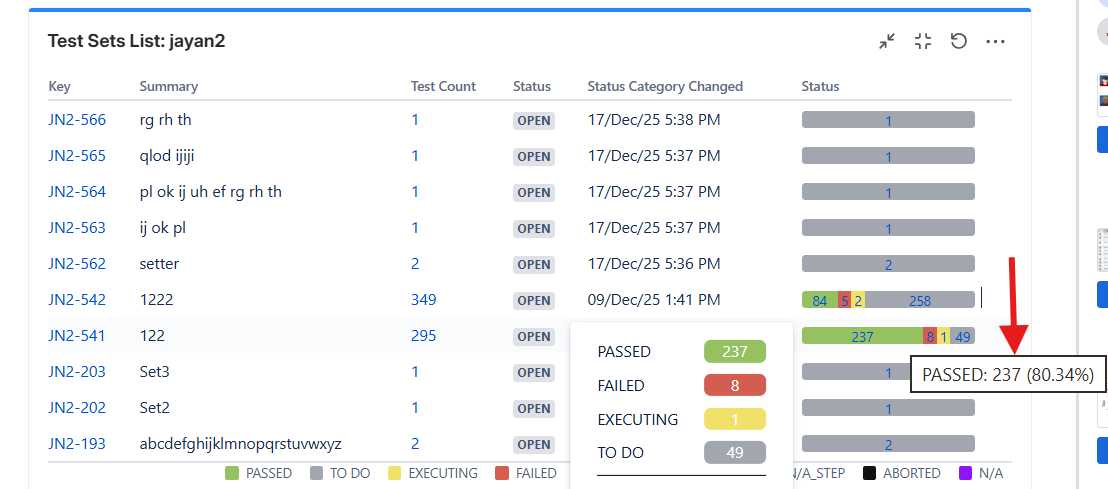
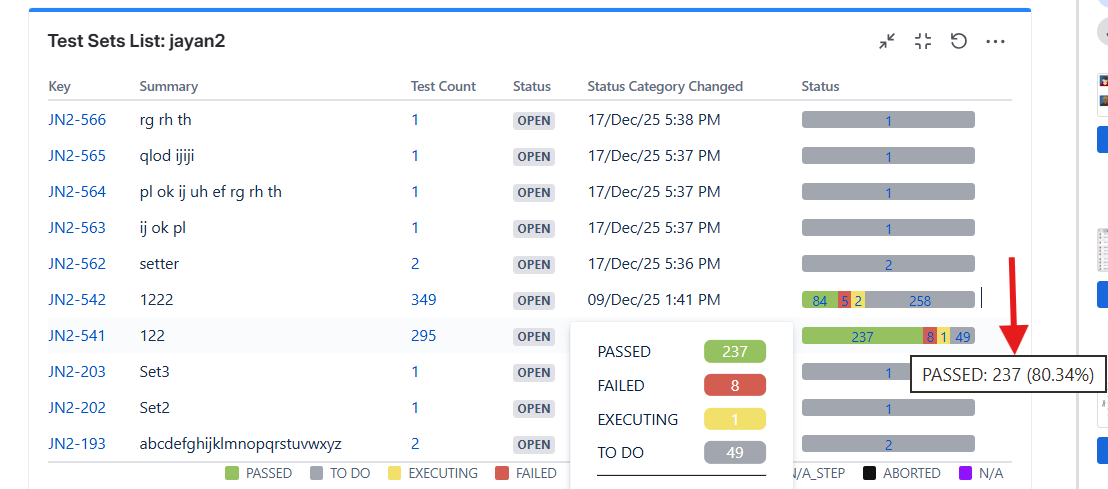
Users cannot see the percentage split of statuses (PASSED, FAILED, EXECUTING, TO DO, etc.) at a glance in the pop-up box. They have to hover over each colour section in the bar one by one to read each value.
Steps to reproduce (right now) / Actual Result:
- Open the Test Set List gadget.
- Click the status bar to open the status summary pop-up box.
- Observe that the pop-up lists only counts per status, with no percentage.
- To get a percentage, hover over each colour segment in the bar individually.
IMPACT
Reading the status distribution requires repetitive hovering, and the pop-up box does not give a quick proportional view of test progress.
What would improve if solved:
The status summary pop-up box would display the percentage alongside the count for each status, so users see the full proportional breakdown in one place without hovering.
Impact on stakeholders:
Affects users who rely on the Test Set List gadget to track testing progress at a glance during test cycles.
Current workaround:
Hover over each colour segment in the status bar individually to read each status percentage, or calculate percentages manually from the counts.
CONTEXT & EXAMPLES:
This applies to the status summary pop-up box on the Test Set List gadget.
Concrete example:
In the "Test Sets List: jayan2" gadget, the status summary pop-up box shows PASSED 237, FAILED 8, EXECUTING 1, TO DO 49, but no percentages. The percentage (e.g. "PASSED: 237 (80.34%)") only appears when hovering over that individual colour segment in the Status bar. See attached screenshot.
Workaround risk:
Reading counts without percentages can make it harder to gauge true progress proportions quickly.