Details
-
Bug
-
Status: Resolved
-
 High
High
-
Resolution: Fixed
-
Xray Cloud 16.2.0
-
None
-
N/A
Description
Description
Editing the Test Step User Picker field on an existing Test Step and saving a different user results in the field permanently showing "Invalid User." The field works correctly the first time it is set on a new Test Step; only editing an already-set value is affected.
Pre-conditions
- A Test Step custom field of type User Picker is configured.
- The Test Step already exists and has a value set for that field (bug only reproduces on edit, not on first-time creation).
- Confirmed on Xray Cloud; customer confirms the equivalent flow works correctly on Jira DC.
How to reproduce
- Configure a Test Step field like the image below:
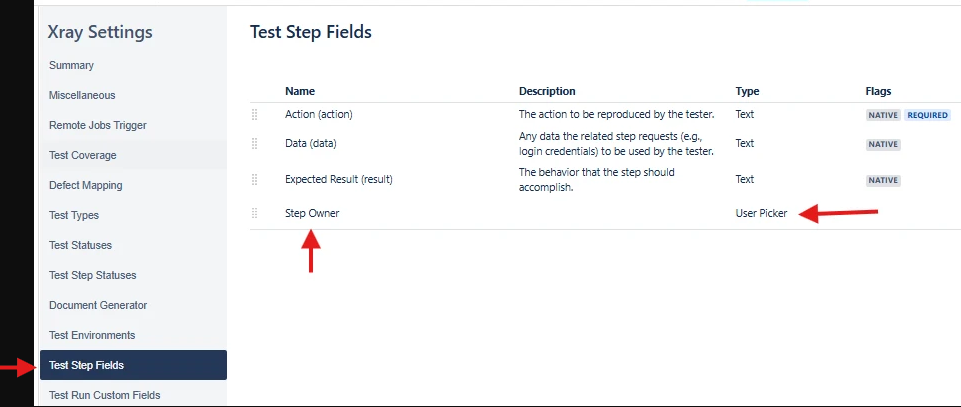
- Create a test step and fill out the field, adding a user to the User Picker field.
- Save the field.
- Reopen the test step and edit the User Picker field, selecting a new user.
Actual result:
The Step Owner field displays "Invalid User" after the edit is saved and the page is refreshed.
Expected result:
Changing the Step Owner to a different valid Jira user and saving should persist that user's correct accountId and display the selected user's name after save/refresh, the same as it does on initial field creation.
Attachments
Issue Links
- is duplicated by
-
XCC-3121 Loading...