Details
-
Bug
-
Status: Waiting Approval
-
 Medium
-
Resolution: Unresolved
-
Xray Cloud 16.6.0
-
None
-
None
-
Cloud
Description
Description
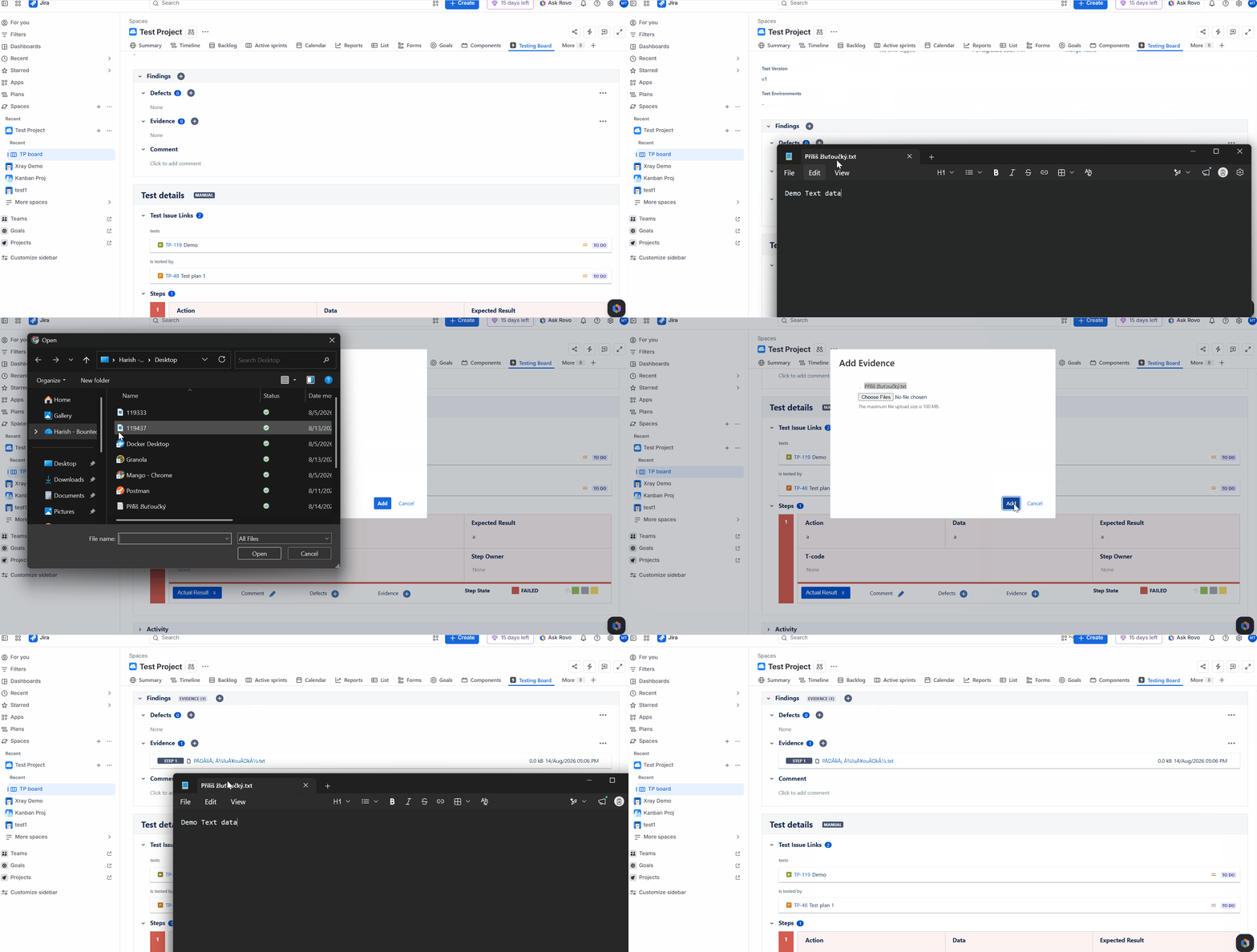
When a file with Czech diacritic / special characters characters in its filename is uploaded as Evidence or Attachments, the filename is displayed incorrectly on the Test Run page and Test Step attachments. Only the original filename is corrupted and appears with invalid characters, indicating a character encoding issue.
Reproduced with:
- Czech
- Chinese
- Hebrew
Pre-conditions
- Xray Cloud is installed and configured.
- A Manual Test exists within a Test Execution.
- A text file with Czech diacritic characters in the filename is available (e.g., Příliš žluťoučký.txt).
How to reproduce
- Open a Manual Test Run.
- Navigate to the Evidence section.
- Upload a file with Czech diacritic characters in the filename (e.g., Příliš žluťoučký.txt).
- Save the evidence.
- Observe the filename displayed in the Evidence section.
Actual result/Attachments
- The filename is displayed incorrectly on the Test Run page.
- Example:
- Expected filename: Příliš žluťoučký.txt
- Displayed filename:
{
Unknown macro: \{PÅÃliÅ¡ žluÅ¥ouÄký.txt}
}
- The filename appears to be encoded/decoded incorrectly.
Attachment: Screenshot showing the discrepancy between the local filename and the filename displayed in Xray.
Expected result
The filename should be displayed exactly as uploaded, preserving all Czech diacritic characters.
Example:
- Uploaded filename: Příliš žluťoučký.txt
- Displayed filename: Příliš žluťoučký.txt
Version
- Xray Cloud: 16.6.0
Workaround
NA
Attachments
Issue Links
- duplicates
-
XCC-3215 Loading...