Details
-
Bug
-
Status: Open
-
 Medium
-
Resolution: Unresolved
-
Xray Cloud 6.10.0
-
None
-
None
-
Health Check
-
Enterprise
-
Description
Description
In a new Jira Cloud instance, when the Sub-task issue type is disabled during Xray installation, the Xray Sub-Test Execution issue type is not created automatically as expected.
After enabling the Sub-task issue type manually and attempting to reinstall Xray through the Health Check page, the operation fails with an HTTP 500 error.
How to reproduce
- Create a new Jira Cloud site.
- Go to Jira Settings → Issues → Issue Types and ensure the Sub-task issue type is disabled.
- Install Xray Cloud from the Atlassian Marketplace.
- Go to Xray → Health Check and verify that “Xray Issue Type Sub Test Execution was not installed” appears.
- Enable the Sub-task issue type in Jira.
- Return to Xray → Health Check.
- Click Reinstall Xray to recreate missing entities.
Actual result/Attachments
The reinstall fails and the following error appears on the screen:
An error occured while reinstalling Xray: AxiosError: Request failed with status code 500
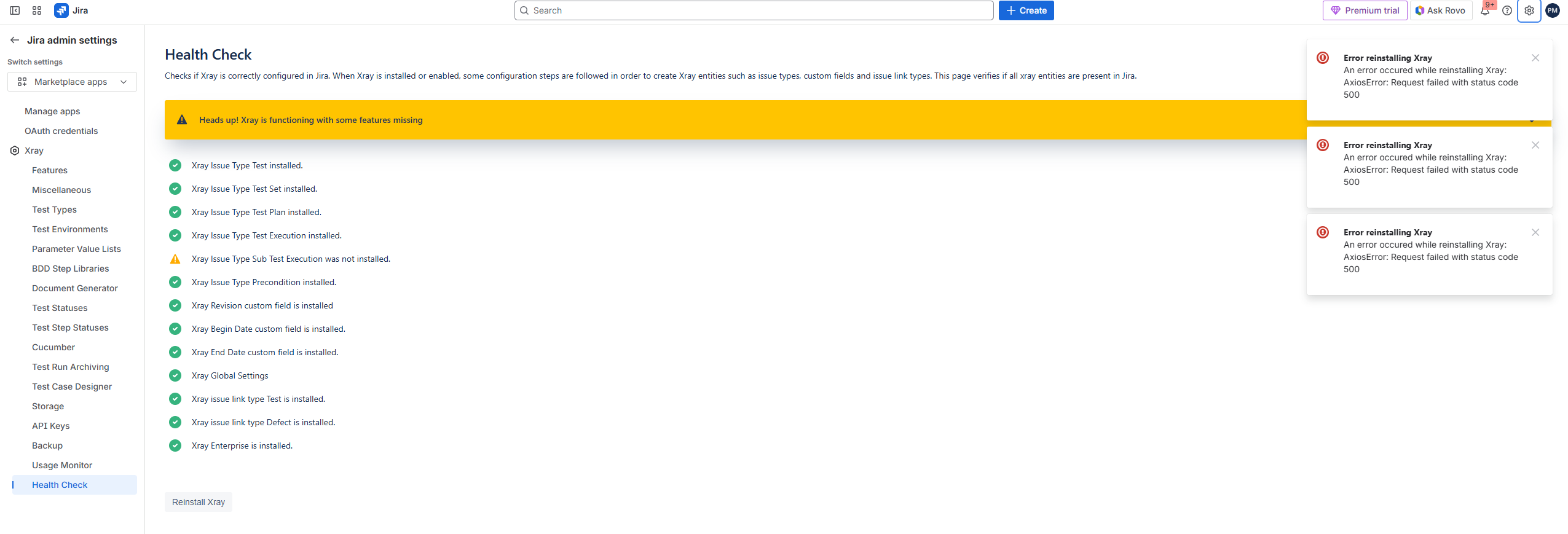
Expected result:
Xray should successfully reinstall and create the Sub-Test Execution issue type once the Sub-task issue type is enabled.
Version
- 6.10.0
Attachments

Issue Links
- duplicates
-
XCC-2064 Loading...