Details
-
Bug
-
Status: Closed
-
 Medium
-
Resolution: Resolved
-
Xray Cloud 6.12.2
-
UI
Description
Description
When Tests are migrated, they are failing to synchronize some of their data with Jira, we are observing it on the "properties">"testType">"name" and "properties">"testType">"kind."
Pre-conditions
How to reproduce
Steps to Reproduce:
First Scenario:
- Migrate your Xray instance to a new Cloud instance.
- Verify that all existing Tests are available in the new Cloud instance after the migration.
- Create a new Test in the Cloud instance.
- Open one of the migrated Tests.
- Add a new Test Step to the migrated Test and confirm it is saved and displayed correctly.
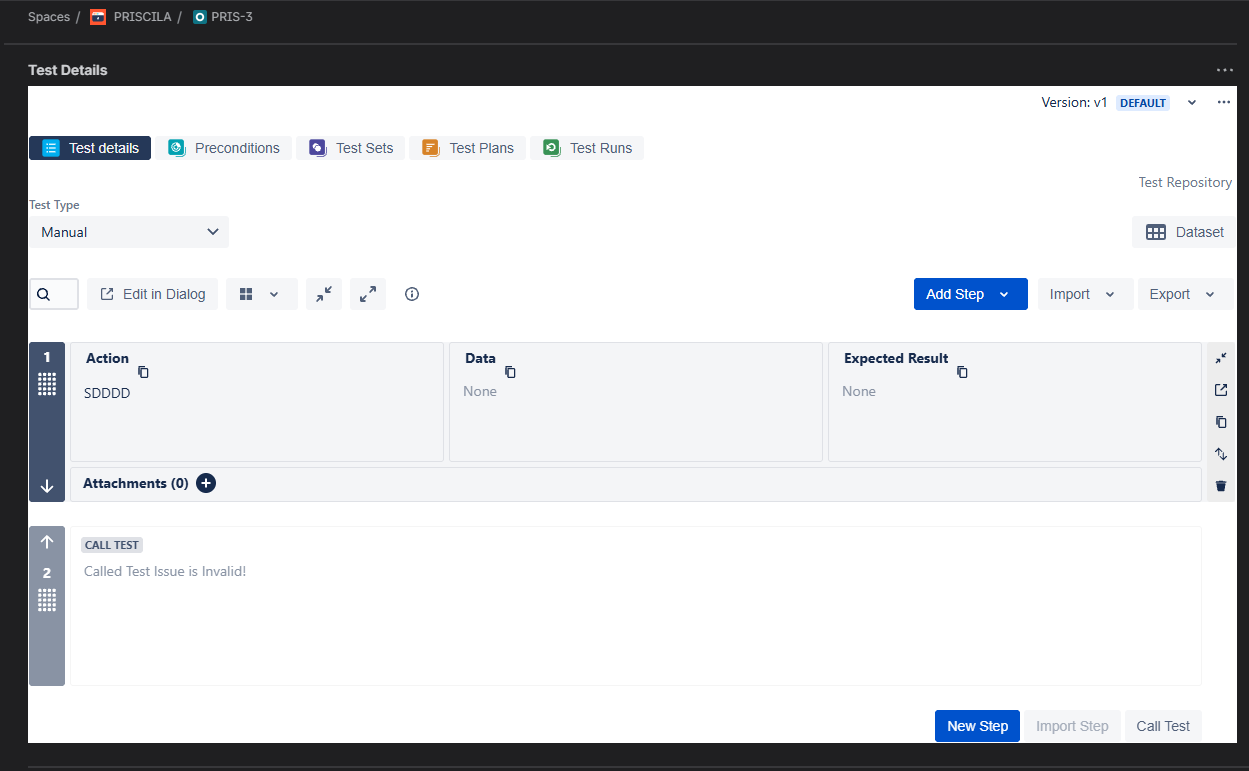
- Attempt to add a Call Test step that references a migrated test.
- Observe that the Call Test step does not appear or is not added successfully
Second Scenario:
- Migrate your Xray instance to a new Cloud instance.
- Open the Jira Issue Navigator.
- Run a JQL query to search for migrated Tests:
project = YOUPROJECT AND issuetype = Test AND testType = Cucumber
- Open the Test List report.
- Observe that no migrated Tests are displayed in the report.
- Manually navigate to the migrated Tests and verify that they do exist and are accessible.
Actual result/Attachments
Migrated tests do not appear in the Test List report and are not returned by JQL searches, even though they exist and can be accessed directly. Additionally, Call Test steps referencing migrated tests do not display as expected
Expected result
Migrated tests should appear correctly in the Test List report and be returned by JQL searches, just like newly created tests. Additionally, Call Test steps that reference migrated tests should display and function as expected.
Version
- 6.12.2
Workaround
N/A