Details
-
Bug
-
Status: Open
-
 Minor
Minor
-
Resolution: Unresolved
-
Xray DC 8.2.3
-
None
-
None
-
Data Center
Description
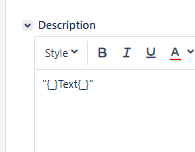
When exporting a wiki field that contains italic text enclosed in double quotes, the exported output includes extra "{}" characters. This happens because, when content is written in Visual mode, Jira adds markup that appears in Text mode as
"{_}This is italic{_}"
Preconditions
A template is added to the Document Generator feature (see attached example template).
Steps to Reproduce
1) Create an issue.
2) Select the Description field in Visual mode.
3) Type a double quote (").
4) Click the Italic button.
5) Enter some text.
6) Click the Italic button again.
7) Type another double quote (").
8) Save changes.
9) Export using the Document Generator feature template.
Actual Result / Attachments
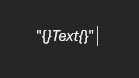
The exported description contains "{}Text{}".
Expected Result
The text should be exported exactly as it appears in the Jira field, without any additional brackets. "Text"
Version
8.2.3-j9
Workaround
In Jira, switch the field to Text mode and manually remove the brackets. For example:
"{_}This is italic{_}" -> "_This is italic_"
Attachments
Issue Links
- duplicates
-
XDC-990 Loading...